
The field guide · Earth
What do white and black areas on Schumann charts mean?
A white or black region on a Schumann spectrogram has no universal meaning. White may be the top of a colour scale; a dark region may represent low values. Either colour can also mark unavailable data. The legend, measurement status and station notes decide what you can conclude.
Schumann Pulse · reading the signal
Same values. Different colours.
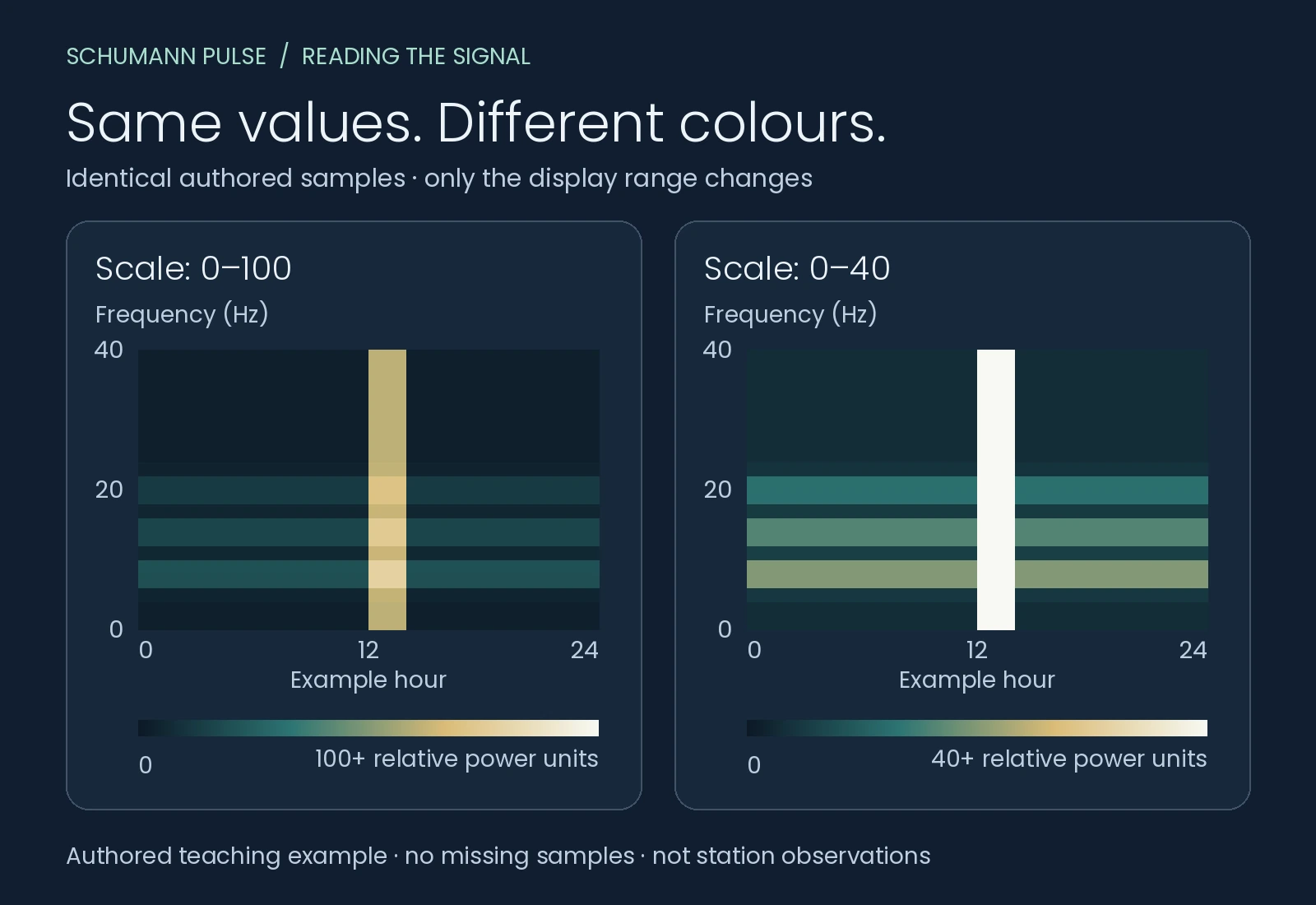
Only the colour range changes. Both panels show the exact same authored values in relative power units.
Scale: 0–100
Frequency (Hz) ↑
Example hour →
0100 and above
More colour steps remain above the bright patch.
Scale: 0–40
Frequency (Hz) ↑
Example hour →
040 and above
The same patch reaches the display ceiling and turns white.
Authored teaching example, not station observations. All samples here are present. White marks this palette’s ceiling, not a proven instrument overload.
Why can the same recording look whiter?
A spectrogram turns numerical values into colours. Its horizontal axis usually shows time and its vertical axis frequency; colour represents the quantity named in the legend. The colour range is a display choice. It is not an extra measurement.
In our teaching figure above, both panels contain exactly the same invented values. One spreads the colours over 0–100 relative power units. The other reaches white at 40 and uses white for larger values too. The vertical bright patch therefore looks much more dramatic in the second panel, although the numbers and frequency positions are unchanged.
This is how colour mapping works in ordinary plotting software: the lower limit, upper limit and missing-data colour can be set separately. Matplotlib’s official example demonstrates those choices; it does not document the software used by a particular observatory. Matplotlib’s masked-value and colour-range example [2].
Does a whiteout mean an unusually strong signal?
Only if the legend defines white as high values and the samples are valid. Even then, the chart alone may not identify the source. A bright region can include interference. “Whiteout” is an informal description of an image, not a standardized Schumann-event class.
Distinguish two limits. A display ceiling means several different numbers receive the same colour. Instrument clipping means the recording system could not represent the incoming signal correctly. White pixels can show the first without proving the second. You need instrument or quality information to establish clipping.
Nagycenk’s observatory report provides a useful real-world lesson: its electric and magnetic channels use different colour scales, and local interference can obscure the resonance bands. The report also describes monitoring data quality. Those details matter more than how striking a screenshot appears. Nagycenk ELF quick-look report [1].
Does a blackout mean Schumann resonance stopped?
No: a black area alone does not establish that. First find out whether it contains valid low readings or unavailable samples. If an entire interval is blank, the picture cannot tell you whether the interruption happened in acquisition, processing or publication. Check the operator’s status information before assigning a cause.
Low is a measurement.
Missing is a status.
Valid low value
A sample exists. In this invented example, a value near the bottom of the scale is dark.
No valid sample
We use hatching to show an unavailable interval. There is no number to compare with a low value.
An unfilled part of a daily chart may also lie beyond the latest published observation. Compare the last sample time with the chart’s time zone. Do not describe a future or unfinished section as a measured period of zero activity.
Does a tall white band mean the frequency rose?
A bright vertical feature spans many frequencies during a short interval. It does not, by itself, show a resonance peak moving upward. A change in peak frequency is a change in position along the frequency axis, established from the spectrum or a fitted frequency series.
Use our frequency guide for mode positions and the chart-reading guide for the difference between a spectrum, spectrogram and time series. A colour image alone cannot supply a missing numerical amplitude, frequency or quality factor.
What should I check before sharing a screenshot?
- Station and channel: which observatory, sensor and field component produced it?
- Time: what time zone and last valid sample does the image show?
- Legend: what quantity, units and colour limits are used? Is the scale logarithmic?
- Availability: are gaps, invalid samples or unfinished hours marked?
- Context: is there an operator note about interference, maintenance or processing?
If those details are absent, describe what you can see without inventing an event: “A bright patch is visible, but its measurement context is missing.” A second station can add context, but its colours are not automatically comparable. See why stations show different readings.
For a current observation, open today’s station readings and keep the source and timestamp attached. The examples on this page teach display interpretation; they do not depict today’s environment or anyone’s health.
Try a chart yourself
Explore our interactive chart lab: change power, centre frequency, peak width or colour scale while a fixed reference stays visible. All examples are authored teaching models.
Sources
References in the text lead here. Original publications open in a new tab; this guide stays open.
- [1] Szabóné André and colleagues: near real-time ELF observations at Nagycenk, Geophysical Observatory Reports, published 2021 (opens in a new tab) Back to text ↑.
- [2] Matplotlib documentation: masked values, colour limits and out-of-range colours (opens in a new tab) Back to text ↑.
Your next observation
Put a reading beside your own experience.
Record how you feel, with optional energy, mood and focus ratings. Revisit your entries alongside dated station readings and explore comparisons when enough suitable records are available.
iPhone app coming soon · history and personal comparisons live in the app.